Tampilkan postingan dengan label Tools. Tampilkan semua postingan

Download Asus Flash Tool All Version ( Lama & Terbaru) + Cara Install

Download Asus Flash Tool All Version ( Lama & Terbaru) + Cara Install - untuk melakukan flashing Smartphone Android Asus. Selain itu, Asus Flash Tool juga sudah mendukung seri baru Asus ZenFone 3. Setelah memperbarui ini, Asus Flash Tool sekarang memenuhi syarat untuk mendukung semua seri baru dari ponsel Asus. Jika Anda ingin melakukan flashing firmware pada perangkat Asus maka Asus FlashTool terbaru ini dapat membantu Anda memperbarui perangkat Anda.


Cukup unduh Asus Flashtool dari bagian unduhan bawah dan firmware flash yang sesuai dengan perangkat Asus anda. Tidak perlu pergi ke mana pun untuk memperbaiki perangkat Asus Anda. Asus Flash Tool  ini adalah tools resmi untuk melakukan flashing hampir semua smartphone seri Asus dan Asus ZenFone 3, termasuk seri terbaru.

Jika Anda pengguna pemula dan tidak tahu cara menggunakan installer Asus Flash Tool, ikuti cara atau langkah-langkah di bawah ini :

Download  Asus Flash Tool v.1.0.0.45

Di sini kami mengatur metode kerja lengkap dari Asus Flash Tool terutama pada bagian unduhan. Pertama, silahkan unduh Asus Flash Tool versi terbaru, unduh gratis di bawah ini kemudian unduh juga driver usb nya,  selanjutnya siapkan firmware smartphone Asus yang sesua dengan seri yang anda miliki, jika belum punya bisa unduh melalui link di bawah ini juga :


Daftar Model Device Smartphone & Tablet Yang didukung Asus Flash Tool v.1.0.0.45 :

A11, A68M, A91, A400CG, A450CG, A500CG, A501CG, A502CG, A500KL, A600CG, A601CG, FE170CG, FE171CG, FE171MG, FE375CG, FE375CXG, FE375CL, FE380CG, FE380CXG, ME70C, ME70CX, ME103K, ME170C, ME171C, ME175CG, ME176C, ME176CE, ME176CX, ME181C, ME181CX, ME372CG, ME372CL, ME375CL, ME560CG, ME572C, ME572CL, ME581C, ME581CL, ME7530CL, PF400CG, PF400CL, PF451CL, PF500KL, TF103C, TF103CE, TF103CG, TF303CL, TF303K, Z170C, Z170CG, Z370C, Z370CG, Z580C, Z580CA, Z451CG, ZE500CL, ZE500KG, ZE500KL, ZE550ML, ZE551ML

Cara Install & Menggunakan Asus Flash Tool v.1.0.0.45

Untuk mem-flash semua Smartphone Asus, Anda perlu mengunduh Asus Flash Tool di atas, firmware dan driver Asus pada pc.

Langkah 1 : Pertama silahkan unduh Asus Flashtool dan ekstrak di komputer.


Langkah 2 : Jalankan Asusflashtoolinstaller.msi sebagai administrator dan ikuti petunjuk di layar untuk menginstal pengaturan Asus Flashtool.

"Jika Anda menemui kesalahan saat menjalankan Asus Flash Tool pada pccoba  jalankan file "Setup.bat" file ini akan menginstal semua file pendukung secara otomatis.
Langkah 3 : Setelah berhasil menginstalasi Asus Flash Tool, jalankan Asus flashtool pada pc.
Langkah 4 : Ekstrak firmware atau rom di komputer.
Langkah 5 : Selanjutnya masukkan perangkat Asus ke mode fastboot atau mode bootloader.
[Matikan smartphone >> Tekan & Tahan Volume up + Tombol volume down bersamaan pada saat yang bersamaan]


Langkah 6 : Hubungkan perangkat dengan PC menggunakan kabel USB.
Langkah 7 : Asus bootloader akan menginstal driver Asus secara otomatis. Jika tidak, instal driver Asus USB secara manual.


Langkah 8 : Jika perangkat terhubung dengan benar dengan pc, Anda akan melihat nomor seri dan sinyal status biru.


Langkah 9 : Selanjutnya memilih model perangkat dari menu drop down Model.


Langkah 10 : Selanjutnya klik "Browse" dan cari firmware Asus.
[Asus Flash Tools hanya mendukung file-file firmware ekstensi .raw]
Langkah 11 : Klik "Serial number" dan pilih model perangkat.


Langkah 12 : Jika semuanya ok, tekan tombol Start untuk memulai proses flashing firmware Asus.
Langkah 13 : Proses flashing akan mulai secara otomatis, tunggu untuk menyelesaikannya.
Langkah 14 : Pada saat yang sama, Anda mungkin melihat proses pembaruan perangkat lunak di layar ponsel Anda.
Langkah 15 : Akhir dari proses, Status akan menjadi hijau dan Anda mungkin melihat pesan "Flash Image Successfully" di layar.


Smartphone akan reboot secara otomatis, 
Proses Flash Selesai, kemudian cabut kabel dan atur kembali perangkat Anda.

Readme First :
[*] Backup & Cadangkan Data : Proses flashing menggunakan Asus Flash Tool akan menghapus semua data pengguna dan data ponsel anda dan akan memperbaharui perangkat lunak android baru di perangkat Asus Anda.

Cara Install dan Menggunakan Xiaomi Mi Flashtool Terbaru

Assalamualaikum wr wb, selamat datang kembali di kandankjoang.com, kali ini saya akan bagikan tutorial cara menggunakan tool flash dari xiaomi yaitu Mi Flash Tool. Untuk cara menggunakan nya mungkin tidak jauh bebeda dengan beberapa tools flash lain semisal Research Download, Sp Flashtool, QFIL atau yang lain namun mungkin khusus untuk Mi Flash Tool harus di install ke komputer terlebih dahulu, karena tool yang satu ini di luncurkan dalam bentuk installer oleh pengembang dari xiaomi.

Berikut adalah petunjuk tentang cara menggunakan Xiaomi Mi Flash Tool untuk menjalankan flash firmware pada setiap xiaomi smartphone ( smartphone xiaomi berbasis Qualcomm chipset ).

Cara Menggunakan Xiaomi Mi Flash Tool:
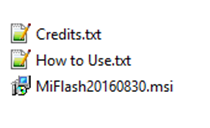
Langkah 1: Download dan ekstrak Xiaomi Mi Flash Tool di komputer Anda. setelah ekstrak selesai  Anda akan dapat melihat file-file berikut:
Langkah 2: Sekarang, buka File Setup untuk menginstal Xiaomi Mi Flash Tool pada komputer Anda.
Langkah 3: Download dan extract firmware xiaomi (fastboot file) di komputer Anda. setelah mengeluarkan xiaomi firmware, Anda akan dapat melihat file yang sama:
Langkah 4: Selanjutnya, Anda perlu menginstal Qualcomm USB Driver pada komputer Anda (Anda juga dapat mendownload Qualcomm USB Driver secara terpisah).

Langkah 5: Switch Off perangkat xiaomi anda.
Langkah 6: Sekarang, Anda perlu boot perangkat xiaomi ke Download Mode (fastboot mode). Untuk boot ke download mode: tekan dan tahan tombol Power + Volume bawah sekitar 6-8 detik.

Langkah 7: Jika berhasil maka anda akan dapat melihat layar berikut pada perangkat Anda:

Langkah 8: Sekarang, hubungkan perangkat Xiaomi Anda ke komputer menggunakan kabel USB.
Langkah 9: Kemudian, buka Xiaomi Mi Flash Tool dari Start Menu windows komputer.
Langkah 10: Setelah Xiaomi Mi Flash Tool diluncurkan Anda akan dapat melihat tampilan berikut:

Langkah 11: Sekarang, klik pada tombol Select dan arahkan ke folder Firmware.
Langkah 12: Selanjutnya, klik pada tombol Refresh hingga device smartphone terdeteksi, baru kemudian klik tombol Flash untuk memulai proses flashing.

Langkah 13: Jika proses flashing selesai dan berhasil, Anda akan dapat melihat pesan Sucess dalam Xiaomi Flash Tool seperti layar berikut.

Demikian cara install dan menggunakan Xiaomi Mi Flash Tool pada perangkat komputer, Jika menemui kendala saat unduh file-file diatas, atau kendala saat proses installasi dan penggunaan Mi Flash Tool, silahkan tingalkan komentar di bawah ini. Sekian dari saya selamat mecoba semoga bermanfaat. Wassalamualaikum wr wb

Catatan:
[#] Compability:
Anda dapat mengikuti tutorial di atas untuk flash firmware saham pada hampir semua xiaomi perangkat yang berjalan pada qualcomm chipset
[#] Backup: Pastikan untuk membackup data anda terlebih dahulu jika akan melakukan pembaruan atau upgrade software/firmware dengan metode ini, karena data akan hilang secara permanen setelah proses flash selesai.
[#] SafeLink: Mohon Maaf sebelumnya jika teman-teman terganggu atau kurang nyaman dengan adanya SafeLink dan ShrinkWeb, Mohon pengertianya untuk teman-teman sekalian, karena ini demi keberlangsungan dan perkembangan blog kita kedepan. SafeLink dan ShrinkWeb bisa di lewati setelah beberapa detik ( sekitar 5 detik ) setelah itu teman-teman bisa mengarahkan langsung ke link download file dan program.
[#] tags: Cara Install dan Menggunakan Xiaomi Mi Flashtool Terbaru 2015, Cara Install dan Menggunakan Xiaomi Mi Flashtool Terbaru 2016, Cara Install dan Menggunakan Xiaomi Mi Flashtool Terbaru 2017, Cara Install dan Menggunakan Xiaomi Mi Flashtool Terbaru 2018. 
Life Insurance : A Slice of History The modern insurance contracts that weve today for example life insurance, originated coming from the practice of merchants inside the 14th century. It‘s also been acknowledged that different strains of security arrangements have been set up since time immemorial and somehow, they‘re akin to insurance contracts in its embryonic form. The phenomenal development of life insurance from almost nothing one hundred years back to its present gigantic proportion Isn‘t from the outstanding marvels of present-day business life. Essentially, life insurance became perhaps one of the felt necessities of human kind because of the unrelenting interest in economic security, the growing need for social stability, and also the clamor for protection against the hazards of cruel-crippling calamities and sudden economic shocks. Insurance is not a rich man’s monopoly. Gone are the times when just the social elite are afforded its protection because during this modern era, insurance contracts are riddled using the assured hopes of many families of modest means. It‘s woven, because it were, straight into the very nook and cranny of national economy. It touches upon the holiest and the majority sacred ties inside the lifetime of man. The adore of parents. The adore of wives. The adore of youngsters. As well as the adore of business. Life Insurance as Financial Protection A life insurance policy pays out an agreed amount generally mentioned like the sum assured under certain circumstances. The sum assured inside a life insurance policy is supposed to answer for the financial needs along with your dependents in case of your respective death or disability. Hence, life insurance offers financial coverage or protection against these risks. Life Insurance : General Concepts Insurance is really a risk-spreading device. Basically, the insurer as well as insurance company pools the premiums paid by all of their clients. Theoretically speaking, the pool of premiums answers to the losses of each and every insured. Life insurance is really a contract whereby one party insures somebody against loss from the death of another. An insurance on life is really a contract through which the insurer (the insurance company ) for any stipulated sum, engages to pay out a particular amount of cash if another dies inside the time limited from the policy. The payment from the insurance money hinges upon the loss of life and in its broader sense, life insurance includes accident insurance, since every daythe world is insured under either contract. Therefore, the life insurance policy contract is involving the policy holder (the assured ) and also the life insurance company (the insurer ). In return for that protection or coverage, the policy holder pays a premium for the agreed time period, dependent upon the kind of policy purchased. Inside the same vein, it is very important note that life insurance is really a valued policy. Which means that it isn‘t a contract of indemnity. The interest of individual insured in hi or another person’s every daythe world is generally not susceptible of a precise pecuniary measurement. You merely cannot put a price tag on the person’s life. Thus, the measure of indemnity is whichever is fixed inside the policy. However, the interest of somebody insured becomes susceptible of exact pecuniary measurement if it‘s an instance involving a creditor who insures the life of the debtor. During this particular scenario, the interest from the insured creditor is measurable since it is driven by worth of the indebtedness. Common Life Insurance Policies Generally, life insurance policies tend to be marketed to cater to retirement planning, savings and investment purposes aside from those mentioned above. As an example, an annuity can alright provide an income in your retirement years. Whole life and endowment participating policies or investment linked plans (ILPs ) in everyday life insurance policies bundle together a savings and investment aspect together with insurance protection. Hence, for a similar level of insurance coverage, the premiums will cost you greater than purchasing a pure insurance product like term insurance. The upside of those bundled products is the fact that they tend to develop cash as time passes and they‘re eventually paid out when the policy matures. Thus, in case your death benefit is coupled with cash values, the latter is paid out when the insured dies. With term insurance however, no cash value build up could be had. The common practice in many countries is that the marketing of bundled products as savings products. This really is one unique facet of modern insurance practice whereby section of the premiums paid from the assured is invested to develop cash values. The drawback of the practice though is that the premiums invested become subjected to investment risks and in contrast savings deposits, the guaranteed cash value can be lower than the entire level of premiums paid. Essentially, like a future policy holder, you must have a thorough assessment of your respective needs and goals. It‘s only after this step where one can carefully choose the life insurance product that best suits your requirements and goals. In case your target is to guard your family’s future, be certain that the merchandise you‘ve chosen meets your protection needs first. Real World Application It‘s imperative in order to make the foremost away from your money. Splitting your daily life insurance on multiple policies can help you save more income. In case you die while your children are 3 & 5, you‘ll need much more life insurance protection than if your children are 35 & 40. Let us say your children are 3 & 5 now and in case you die, they‘re going to need a minimum of $2, 000, 000 to reside, to visit college, etc. Rather than getting $2, 000, 000 in permanent life insurance, which will certainly be outrageously expensive, just aspire to term life insurance : $100, 000 for permanent life insurance, $1, 000, 000 for any 10-year term insurance, $500, 000 for any 20-year term insurance, and $400, 000 of 30 years term. Now this really is very practical because it covers all that is necessary. In case you die and also the kids are 13 & 15 or younger, they‘re going to get $2M ; when the age is between 13-23, they get $1M ; if between 23-33, they get $500, 000 ; if after that, they still get $100, 000 for final expenses and funeral costs. This really is perfect for insurance needs that changes as time passes because like the children grow, your financial responsibility also lessens. Like the 10, 20, and 30 years term expires, payment of premiums also expires thus you are able to choose to make use of that cash to take a position in stocks and take risks by it. Inside a world run from the dictates of cash, everyone wants financial freedom. Who does not? However we all NEED financial SECURITY. The majority of folks lose sight of the important facet of monetary literacy. They invest everything and risk everything in order to make more but they finish up losing the majority of it, otherwise all- this can be a fatal formula. The very best approach is to bring a portion of your respective money and put money into financial security after which take the remainder of them and put money into financial freedom. Ultimately, your financial plan is consistently evolving because you‘re constantly evolving. You can’t set a plan after which forget it. You have to keep an open eye in your money to ensure It‘s working hard because that cash needs to feed you for the following 20-30+ years that you may be in retirement. You‘ve to understand how to feed your hard earned money now to ensure that it may feed you later.

Download Mi Flash Tool All Version (2014, 2015, 2016 dan Terbaru 2017)

Assalamualaikum wr wb, selamat datang kembali di kandankjoang.com kali ini saya akan share link download Xiaomi Mi Flash Tool semua versi. Xiaomi Mi Flash Tool adalah software yang  memungkinkan Anda untuk melakukan flash firmware (fastboot file) pada perangkat smartphone Xiaomi yang berbasis Chipset Qualcomm. 


Fitur Xiaomi MI Flash Tool

Installer 
Xiaomi Mi Flash Tool diluncurkan sebagai installer, yang berarti Anda harus install terlebih dahulu pada komputer Anda untuk menggunakannya. 

Ketika menginstal tool ini, Anda akan melihat paket-paket yang datang dengan perangkat, Anda akan melihat paket-paket yang dengan tool yang meliputi tool ADB, Driver, dan Mi Tool itu sendiri.

Built-in driver 
Xiaomi Mi Flash Tool ini dilengkapi dengan built-in Driver USB termasuk Google ADB Tool dan Driver, Microsoft MTP dan RNDIS Driver, Qualcomm USB Serial Driver. 

Yang berarti Anda tidak perlu menginstal driver secara manual di perangkat komputer anda.

Multiple Flashing Options
Ada 3 pilihan metode Flash yang tersedia termasuk Flash Semua (Flash All), Flash Semua Kecuali Penyimpanan (Flash All Except Storage) dan Flash Semua Kecuali Data dan Penyimpanan (Flash All Except Data and Storage). 


Flash Semua Kecuali Penyimpanan adalah metode default flashing file fastboot pada Perangkat Xiaomi.

Download Xiaomi Mi Flash Tool
 
MiFlashtool20140509
http://velocicosm.com/GHSS

MiFlashtool20150601

http://velocicosm.com/GHZg


Dalam penggunaan beberapa versi Xiaomi Flash Tool memiliki kriteria sendiri untuk beberapa tipe dari smartphone xiaomi, semisal untuk seri Xiaomi Redmi Note 3 Pro hanya bisa menggunakan Xiaomi Mi Flash Tool versi 2015 ke atas, dan untuk Xiaomi Redmi 2 prime hanya bisa menggunakan Xiaomi Mi Flash Tool versi 2015 kebawah, dan khusus untuk seri smartphone Mi hanya bisa mengguanakan versi 64 bit (pada OS windows dan xiaomi mi flash tool). 

Oleh karena itu pastikan terlebih dahulu mengikuti tutorial dalam peggunaan tool flash yang satu ini, belum tentu xiaomi mi flash tool versi terbaru bisa di gunakan untuk semua seri atau tipe dari smartphone xiaomi berbasis qualcomm chipset. 

Catatan:

[#] Cara penggunaan: Jika Anda mencari panduan step by step cara menggunakan Flash Xiaomi  menggunakan Xiaomi Mi Flash Tool, berikut ini kami sediakan Tutorial nya silahkan masuk ke link Berikut dan ikuti langkah-langkah nya.

[#] Credit: Xiaomi Mi Flash Tool yang dibuat dan didistribusikan oleh Xiaomi inc. Jadi, sepenuhnya creadits ada pada perusahaan tersebut.

[#] SafeLink: Mohon Maaf sebelumnya jika teman-teman terganggu atau kurang nyaman dengan adanya SafeLink dan ShrinkWeb, Mohon pengertianya untuk teman-teman sekalian, karena ini demi keberlangsungan dan perkembangan blog kita kedepan. SafeLink dan ShrinkWeb bisa di lewati setelah beberapa detik ( sekitar 5 detik ) setelah itu teman-teman bisa mengarahkan langsung ke link download file dan program. 
[#] tags: download mi flash, download mi flash tool MiFlashtool20170425,
download mi flash tool MiFlashtool20161222, download mi flash tool MiFlashtool20160830,
download mi flash tool MiFlashtool20160401, download mi flash tool MiFlashtool20151028, download mi flash tool MiFlashtool20150731, download mi flash tool MiFlashtool20150601, download lengkap mi flash tool semua versi. mi flash tool terbaru 2015, mi flash tool terbaru 2016,
mi flash tool terbaru 2017, mi flash tool terbaru 2018,

Download Qualcomm USB Drivers + Cara install

Qualcomm USB Drivers memungkinkan Anda menghubungkan Perangkat Smartphone atau Tablet yang berbasis chipset qualcomm ke komputer Windows. Ini membantu Anda untuk menghubungkan perangkat Anda ke komputer apakah Anda ingin menghubungkan perangkat untuk Flashing Stock Firmware, Flashing IMEI atau hanya menghubungkan perangkat untuk mentransfer data dari perangkat ke komputer.


Di sini, Di halaman ini kami telah berhasil membagi Qualcomm USB Drivers dengan versi terbaru.

Fitur Qualcomm USB Drivers

General Connecting Devices
Hal ini memungkinkan Anda untuk menghubungkan Perangkat Smartphone atau Tablet Anda ke komputer dan mentransfer data antara perangkat dan komputer (pastikan Anda telah mengaktifkan debuggim usb pada perangkat Anda sebelum menghubungkan perangkat ke komputer)

Flashing Firmware
Jika perangkat Anda dalam kondisi bootloop atau tidak menyala, dan Anda ingin mem-flash fimware stok untuk memperbaiki bootloop maka Qualcomm USB Drivers memungkinkan Anda menghubungkan perangkat ke komputer.

Flashing Custom Rom & Rooting
Qualcomm USB Drivers ini juga sangat dibutuhkan jika perangkat Smartphone atau Tablet akan di tambah custom rom atau akan di root untuk menambah akses penuh.


Download Qualcomm USB Drivers


Cara Install Qualcomm USB Drivers


Langkah 1 : Buka folder hasil download diatas, kemudian cari file Qualcomm_USB_Drivers_V1.0.exe
 

Langkah 2 : Buka file tersebut, kemudian klik Next atau Berikutnya


Langkah 3 : Klik I accept, kemudian Next


Langkah 4 : Directory penginstallan pilih saja default, kemudian klik Install


Langkah 5 : Proses Installasi akan berjalan, kurang lebih 1-3 menit


Langkah 6 : Dan selesai, tunggu beberapa saat atau lakukan restart pada komputer, setelah menyala coba hubungkan perangkat Samsung anda.


Readme First :

[*] Hanya Untuk Komputer Windows
: Qualcomm USB Drivers hanya dibuat untuk bekerja dengan Windows Computer Only. Termasuk Windows XP, Vista, Windows 7, Windows 8, 8.1 dan Windows 10.
[*] Dilengkapi Dengan Fitur Installer : Qualcomm USB Drivers juga hadir sebagai penginstal. Anda dapat menginstal terbaru di komputer Anda hanya dalam beberapa klik.

Download Samsung USB Drivers (Old and New Version)

Samsung USB Drivers memungkinkan Anda menghubungkan Perangkat Smartphone atau Tablet Samsung ke komputer Windows. Ini membantu Anda untuk menghubungkan perangkat Anda ke komputer apakah Anda ingin menghubungkan perangkat untuk Flashing Stock Firmware, Flashing IMEI atau hanya menghubungkan perangkat untuk mentransfer data dari perangkat ke komputer.

Di sini, Di halaman ini kami telah berhasil membagi semua version dari Samsung USB Drivers termasuk versi lama atau versi terbaru.

Fitur Samsung USB Drivers

General Connecting Devices
Hal ini memungkinkan Anda untuk menghubungkan Perangkat Samsung Anda ke komputer dan mentransfer data antara perangkat dan komputer (pastikan Anda telah mengaktifkan debuggim usb pada perangkat Anda sebelum menghubungkan perangkat ke komputer)

Flashing Firmware
Jika perangkat Anda dalam kondisi bootloop atau tidak menyala, dan Anda ingin mem-flash fimware stok untuk memperbaiki bootloop maka case Samsung USB Drivers memungkinkan Anda menghubungkan perangkat ke komputer.

Flashing Custom Rom & Rooting
Samsung USB Drivers ini juga sangat dibutuhkan jika perangkat Samsung akan di tambah custom rom atau akan di root untuk menambah akses penuh.


Download Samsung USB Drivers (Old and New Version)


Cara Install Samsung USB Drivers (Old and New Version)

Cara Install Samsung Usb Drivers

Langkah 1 : Buka folder hasil download diatas, kemudian cari file Samsung USB Driver v 1.5.xx.0.exe
 

Langkah 2 : Buka file tersebut, kemudian klik Next atau Berikutnya


Langkah 3 : Sesuaikan bahasa, pilih saja indonesia agar lebih mudah


Langkah 4 : Directory penginstallan pilih saja default (tidak perlu di rubah)


Langkah 5 : Proses Installasi akan berjalan, kurang lebih 1-3 menit


Langkah 6 : Dan selesai, tunggu beberapa saat atau lakukan restart pada komputer, setelah menyala coba hubungkan perangkat Samsung anda.


Readme First :

[*] Hanya Untuk Komputer Windows
: Samsung USB Drivers hanya dibuat untuk bekerja dengan Windows Computer Only. Termasuk Windows XP, Vista, Windows 7, Windows 8, 8.1 dan Windows 10.
[*] Dilengkapi Dengan Fitur Installer : Samsung USB Drivers juga hadir sebagai penginstal. Anda dapat menginstal terbaru di komputer Anda hanya dalam beberapa klik.

Popular Posts